
TapAttack
Read the current rule, compare the cards, inhibit the wrong direction, and tap the one exact match before time runs out.
TapAttack is a visual comparison and task-switching game. Each trial asks your child to find one card by size, shade, quantity, height or width, or two conditions at once. The rule can reverse or change between trials. Across 85 levels, two clearly different cards become larger sets of close alternatives, opposite or negated cues, shorter response windows, and compound rules with convincing one-condition near misses.
- 5 distinct comparison mechanics
- Size, shade, quantity, height or width, and two-condition comparisons each use a different visible property.
- Read first, then tap once
- The cue names the property and direction that matter now. The child compares every card and taps the unique rule match.
- Immediate visual correction
- A correct tap highlights the selected card. A miss marks the chosen and correct cards; two-condition trials can also identify a close answer that satisfied only one condition. Production does not provide a worked text explanation or glossary.
- Level range
- Levels 1-85 · Preschool through Advanced Challenge
See one complete TapAttack trial
This Level 16 Quantity feedback state uses the exact two-card trial selected from production evidence.
- 1
Read the current rule
The cue says to tap the one with the most, so quantity is the only property that decides the answer.
- 2
Compare both groups
One card contains three creatures and the other contains two. The child taps the group of three.
- 3
Check the same cards
The app highlights the correct card and overlays the counts 3 and 2, making the accepted comparison visible before the next trial.
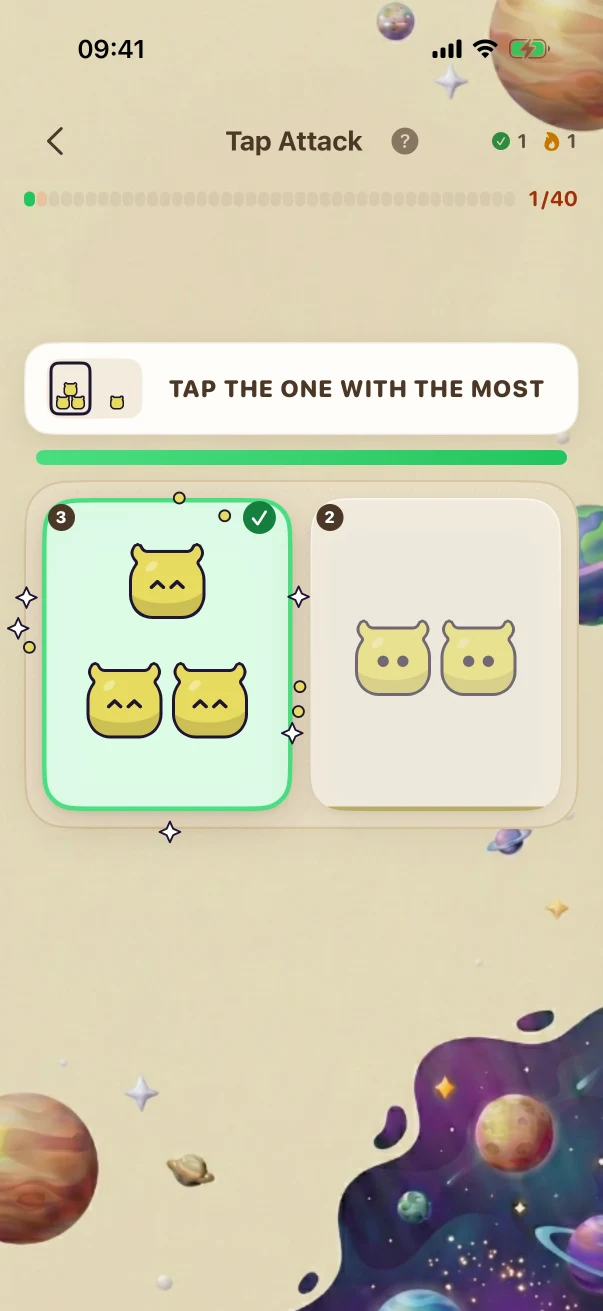
This example stays the same on the website so you can compare it. The app creates new problems during play.
All 5 mechanics, each with an early and later production state
Every comparison uses an app-created trial at the stated level. Later examples change the rule direction, add inhibition or rule switching, make alternatives closer, or combine two dimensions; more cards alone do not count as progression.
Size
Compare how large the creature appears and tap the card matching bigger or smaller.
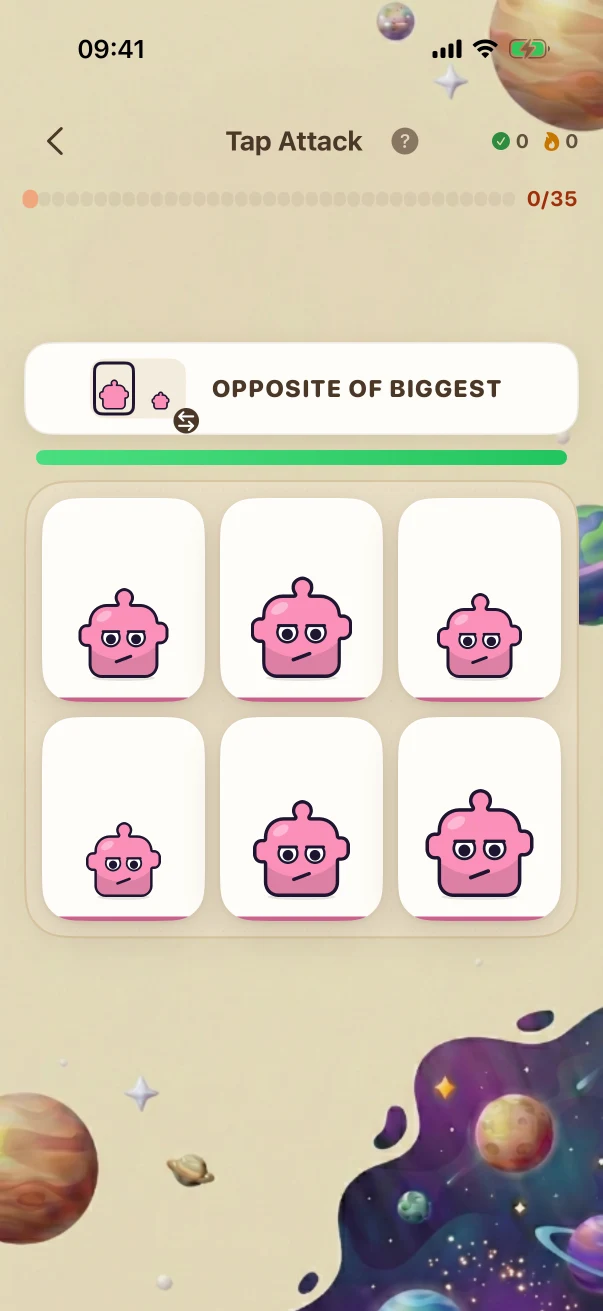
The Level 1 screen asks for the bigger of two clearly different creatures. The Level 85 screen says opposite of biggest, which means finding the smallest among six creatures whose neighbouring sizes differ by as little as five percent.
Size · Later challenge · Level 85 The child is viewing the task before submitting an answer.
Size · Later challenge · Olympiad / Honors Synthesis · Level 85 of 85
- What the child is solving
- OPPOSITE OF BIGGEST (6 cards)
- What counts as correct
- Compare how large the creature appears and tap the card matching bigger or smaller.
The child is viewing the task before submitting an answer.
The correction shows which condition was missed
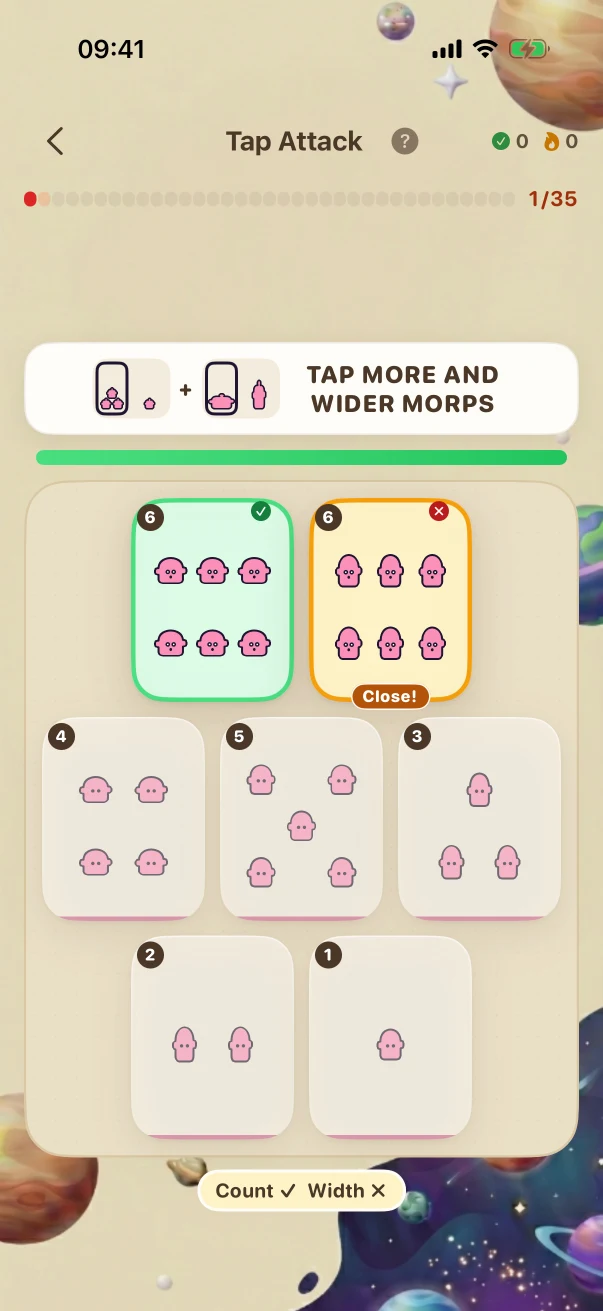
This Level 85 Two Conditions trial asks for more and wider. The selected card has the maximum count but is too tall, so the app treats it as a near miss rather than the full match.
- 1
Apply both parts of the cue
More means the card must contain the most creatures, six. Wider means its creatures must also have the widest proportion on the board.
- 2
Reject a one-condition answer
The chosen card also contains six creatures, but they are tall and narrow. It satisfies quantity only, so the app marks Count as correct and Width as incorrect.
- 3
Reveal the unique full match
The selected near miss is outlined in orange and labelled Close, while the card satisfying both more and wider is highlighted in green on the unchanged trial.
What genuinely changes across the full level path
The comparisons add new rules, operations, representations, interactions, and reasoning steps. Larger numbers or longer item lists alone are not treated as proof that a challenge is harder.
Compare two clear sizes
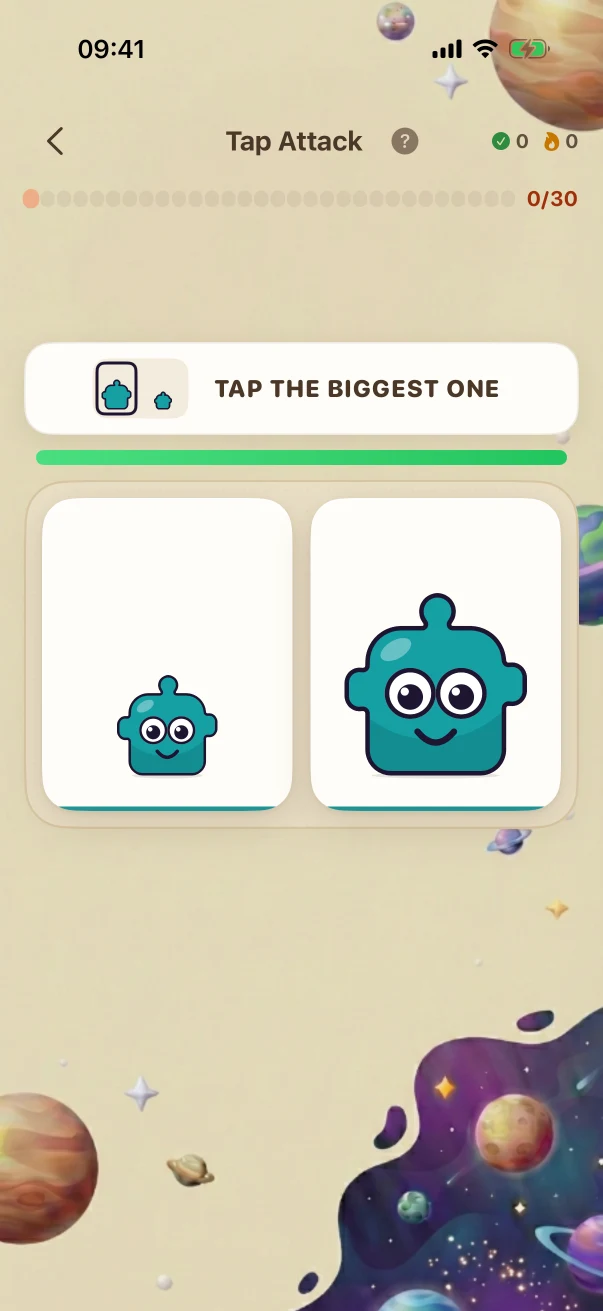
The Level 1 example asks for the bigger of two cards whose creatures differ visibly in size.
Reverse a quantity rule
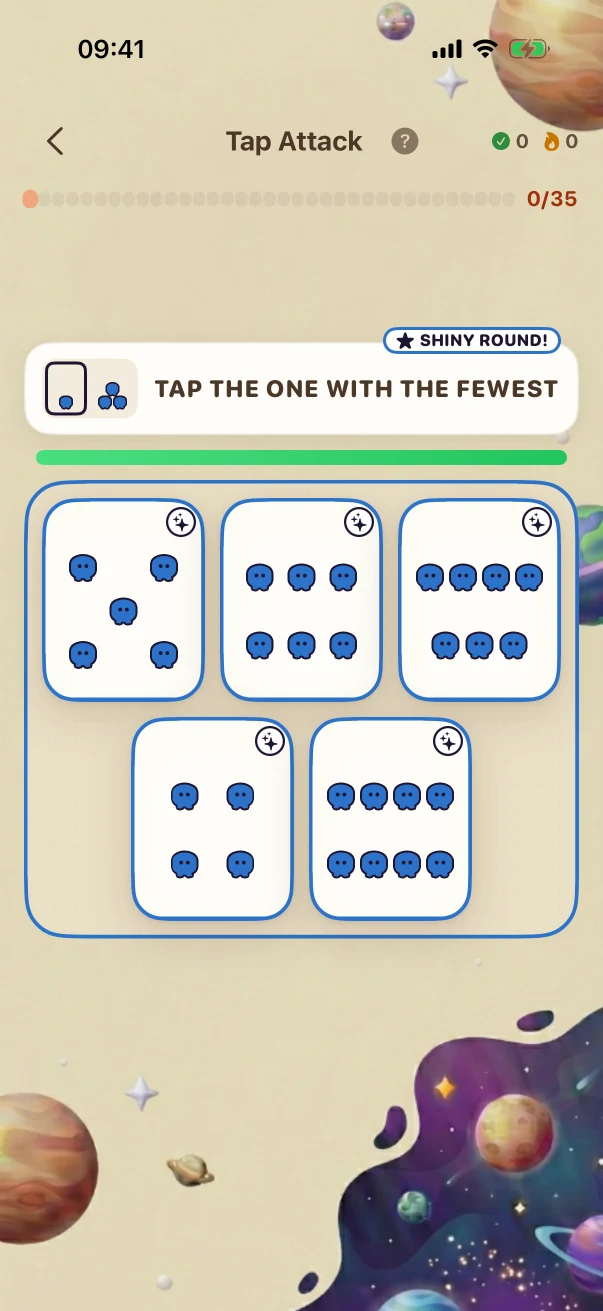
The Level 85 example switches to fewest and requires finding the group of four among groups of five to eight, even though those four creatures are drawn the biggest.
Inhibit the named proportion
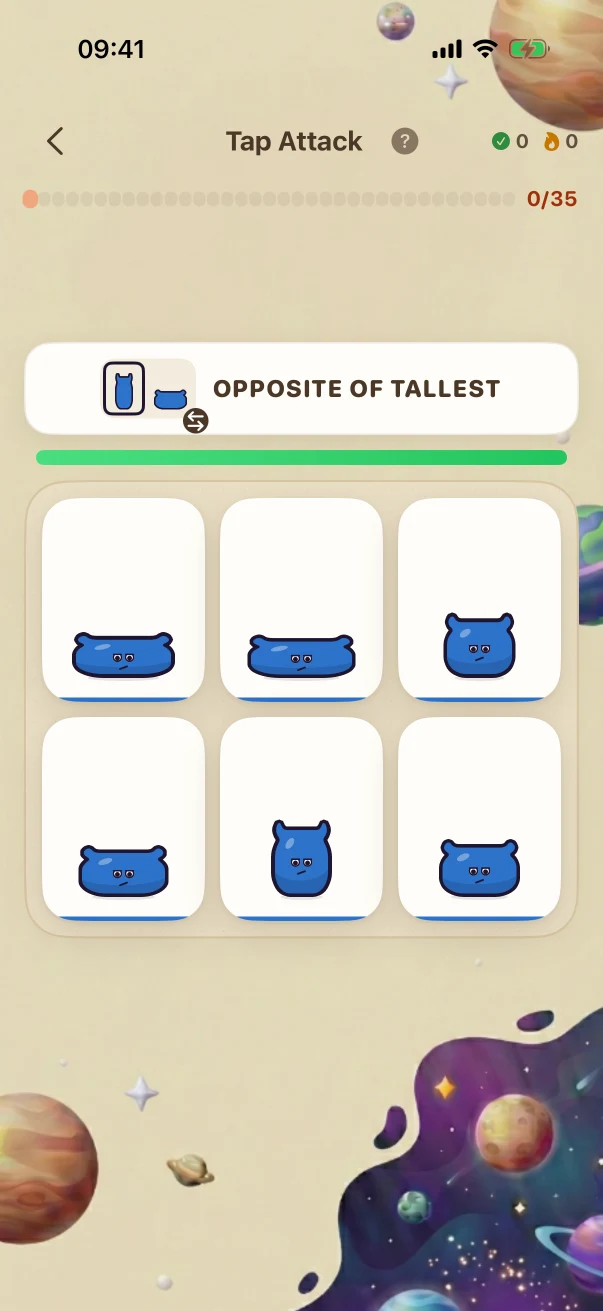
The Level 85 example says opposite of tallest, so the child must translate the negated cue into finding the widest of six closely proportioned cards.
Apply two conditions together
The Level 85 example asks for more and wider across seven cards. One card has the same top count but is tall, and another is just as wide but has fewer creatures.
What the child is practising in the visible task
These are bounded practice goals tied to the actions shown above, not promises that one game replaces teaching or proves mastery.
Compare one relevant property
Size, Shade, Quantity, and Height and Width ask the child to focus on one visible dimension while ignoring the rest.
Inhibit an automatic response
Opposite and negated cues require the child to use the rule that is shown now instead of repeating the previous or most obvious response.
Check both parts of a rule
Two Conditions rewards verifying both dimensions and rejecting cards that look close because they satisfy only one.
Fixed website examples, fresh app practice
The iPhone screenshots in this guide show reviewed examples checked against the app's current problem and answer rules. Use the controls to compare exact app states; the screenshots stay fixed so families can inspect them. At launch, the app will create new practice at the child's own level. Viewing this guide does not change app progress or earn anything toward a Screen Time unlock.
iPhone app screenshots
Use the controls to compare fixed problem and mistake or explanation screenshots. Viewing them does not change app progress or award access points.
Full Braincove app at launch
Fresh TapAttack trials follow the child's level and the mechanics available there. The app changes card count, visual similarity, rule direction, negation, rule switching, compound conditions, and response time. Parents can change the number of trials and choose whether eligible completed app sessions contribute toward the Screen Time unlock rules they set. Core practice can continue through a temporary connection gap; family sync, Daily, homework, and cross-device updates still need connectivity.
Get the app launch email